Docker Standalone vs Swarm Mode Explained for Container Orch
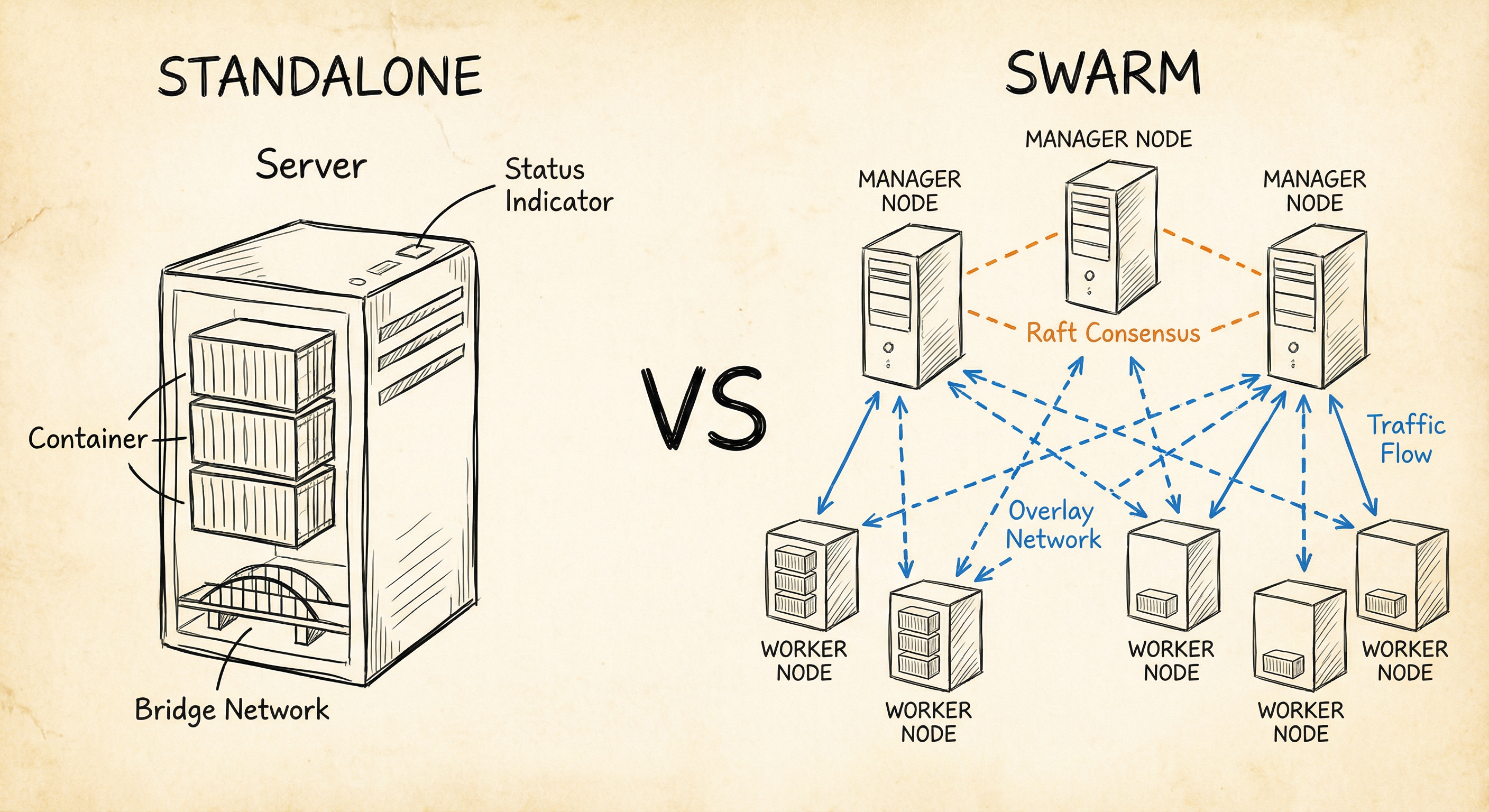
When you start with Docker, you’re running containers on a single machine. But what happens when one server isn’t enough? That’s where Docker Swarm comes in. Let’s break down the architectural differences between running Docker standalone and orchestrating containers with Swarm.
Docker Standalone Architecture
In standalone mode, Docker runs on a single host with one Docker daemon managing all containers.
┌─────────────────────────────────────┐│ Single Host ││ ││ ┌───────────────────────────────┐ ││ │ Docker Engine │ ││ └───────────────────────────────┘ ││ ││ ┌───────┐ ┌───────┐ ┌───────┐ ││ │ C1 │ │ C2 │ │ C3 │ ││ └───────┘ └───────┘ └───────┘ ││ ││ ┌───────────────────────────────┐ ││ │ Bridge Network │ ││ └───────────────────────────────┘ │└─────────────────────────────────────┘How It Works
- One Docker daemon handles everything
- Containers communicate via bridge networking
- You manage containers with
docker run,docker stop,docker rm - No built-in redundancy — if the host goes down, everything goes down
Standalone Commands
# Run a containerdocker run -d --name web -p 80:80 nginx
# List containersdocker ps
# Stop a containerdocker stop web
# View logsdocker logs web
When to Use Standalone
- Local development environments
- Testing and CI/CD pipelines
- Small single-server applications
- Learning Docker fundamentals
Docker Swarm Architecture
Swarm transforms multiple Docker hosts into a unified cluster. It introduces manager nodes for orchestration and worker nodes for running containers.
┌─────────────────────────────────────────────────────────────┐│ Docker Swarm Cluster ││ ││ ┌──────────────┐ ┌──────────────┐ ││ │Manager Node 1│◄───────►│Manager Node 2│ ││ │ (Leader) │ Raft │ (Follower) │ ││ └──────┬───────┘Consensus└──────┬───────┘ ││ │ │ ││ ▼ ▼ ││ ┌─────────────────────────────────────────────────┐ ││ │ Overlay Network │ ││ └─────────────────────────────────────────────────┘ ││ │ │ │ ││ ┌──────▼─────┐ ┌──────▼─────┐ ┌─────▼──────┐ ││ │ Worker 1 │ │ Worker 2 │ │ Worker 3 │ ││ │ ┌──┐ ┌──┐ │ │ ┌──┐ ┌──┐ │ │ ┌──┐ ┌──┐ │ ││ │ │T1│ │T2│ │ │ │T3│ │T4│ │ │ │T5│ │T6│ │ ││ │ └──┘ └──┘ │ │ └──┘ └──┘ │ │ └──┘ └──┘ │ ││ └────────────┘ └────────────┘ └────────────┘ ││ │└─────────────────────────────────────────────────────────────┘How It Works
- Manager nodes maintain cluster state using Raft consensus
- Worker nodes execute tasks (containers) assigned by managers
- Overlay networks enable cross-host communication
- Built-in load balancing routes traffic to healthy containers
- If a node fails, Swarm reschedules tasks on healthy nodes
Swarm Commands
# Initialize swarm on first managerdocker swarm init --advertise-addr 192.168.1.10
# Join workers to the clusterdocker swarm join --token SWMTKN-1-xxx 192.168.1.10:2377
# Create a service with replicasdocker service create --name web --replicas 3 -p 80:80 nginx
# Scale the servicedocker service scale web=5
# View service statusdocker service ps web
When to Use Swarm
- Production deployments requiring high availability
- Microservices architectures
- Applications that need auto-scaling
- Multi-host distributed systems
Side-by-Side Comparison
| Feature | Standalone | Swarm |
|---|---|---|
| Hosts | Single | Multiple (cluster) |
| Management | docker run/stop | docker service create/scale |
| Scaling | Manual | Automatic (replicas) |
| Load Balancing | External (nginx, HAProxy) | Built-in ingress routing |
| Networking | Bridge, host | + Overlay networks |
| Failover | None | Automatic task rescheduling |
| State Management | None | Raft consensus |
| Secrets | Environment variables | Encrypted secrets store |
| Rolling Updates | Manual | Automated with rollback |
Networking Differences
Standalone Networking
Containers on a single host use bridge networking by default. They can reach each other by container name if on the same user-defined bridge network.
# Create a bridge networkdocker network create mynet
# Run containers on the same networkdocker run -d --name api --network mynet myapidocker run -d --name web --network mynet nginx
Swarm Overlay Networking
Swarm uses overlay networks that span multiple hosts. Containers on different physical machines can communicate as if they’re on the same network.
# Create an overlay networkdocker network create --driver overlay backend
# Deploy services on the overlaydocker service create --name api --network backend myapidocker service create --name db --network backend postgres
High Availability
Standalone: Single Point of Failure
Host Down = All Containers Down = Application OfflineThere’s no automatic recovery. You’d need external tools to detect failures and restart containers elsewhere.
Swarm: Built-in Fault Tolerance
Worker Node Fails → Swarm Detects → Tasks Rescheduled → Application Stays OnlineSwarm continuously monitors node health. When a node becomes unavailable, it automatically redistributes workloads to healthy nodes.
Scaling Comparison
Standalone Scaling
# Manual: run more containers yourselfdocker run -d --name web1 -p 8081:80 nginxdocker run -d --name web2 -p 8082:80 nginxdocker run -d --name web3 -p 8083:80 nginx
# Then configure external load balancer to distribute traffic
Swarm Scaling
# Declarative: tell Swarm how many you wantdocker service scale web=10
# Swarm handles placement, networking, and load balancing automatically
Making the Choice
Choose Standalone when:
- You’re developing locally
- Running a simple single-server application
- Learning Docker concepts
- Resources are limited to one machine
Choose Swarm when:
- You need high availability
- Running production workloads
- Your application spans multiple services
- You want automated scaling and failover
- You need built-in load balancing
Migrating from Standalone to Swarm
The transition is straightforward since Swarm uses familiar Docker concepts:
- Initialize Swarm on your primary host
- Join additional nodes to the cluster
- Convert your
docker runcommands to service definitions - Deploy using
docker service createor stack files
# Before (standalone)docker run -d --name web -p 80:80 nginx
# After (swarm)docker service create --name web --replicas 3 -p 80:80 nginx
Your existing Docker Compose files work with minimal changes — just add deploy sections for replica counts and placement constraints.
Conclusion
Docker standalone is perfect for development and simple deployments. Docker Swarm adds the orchestration layer needed for production: clustering, automatic failover, scaling, and load balancing. The best part? You don’t need to learn a completely new tool — Swarm builds on the Docker skills you already have.
Start with standalone to master containers, then graduate to Swarm when your application demands resilience and scale.