What is the Difference Between Docker and Kubernetes
Published:
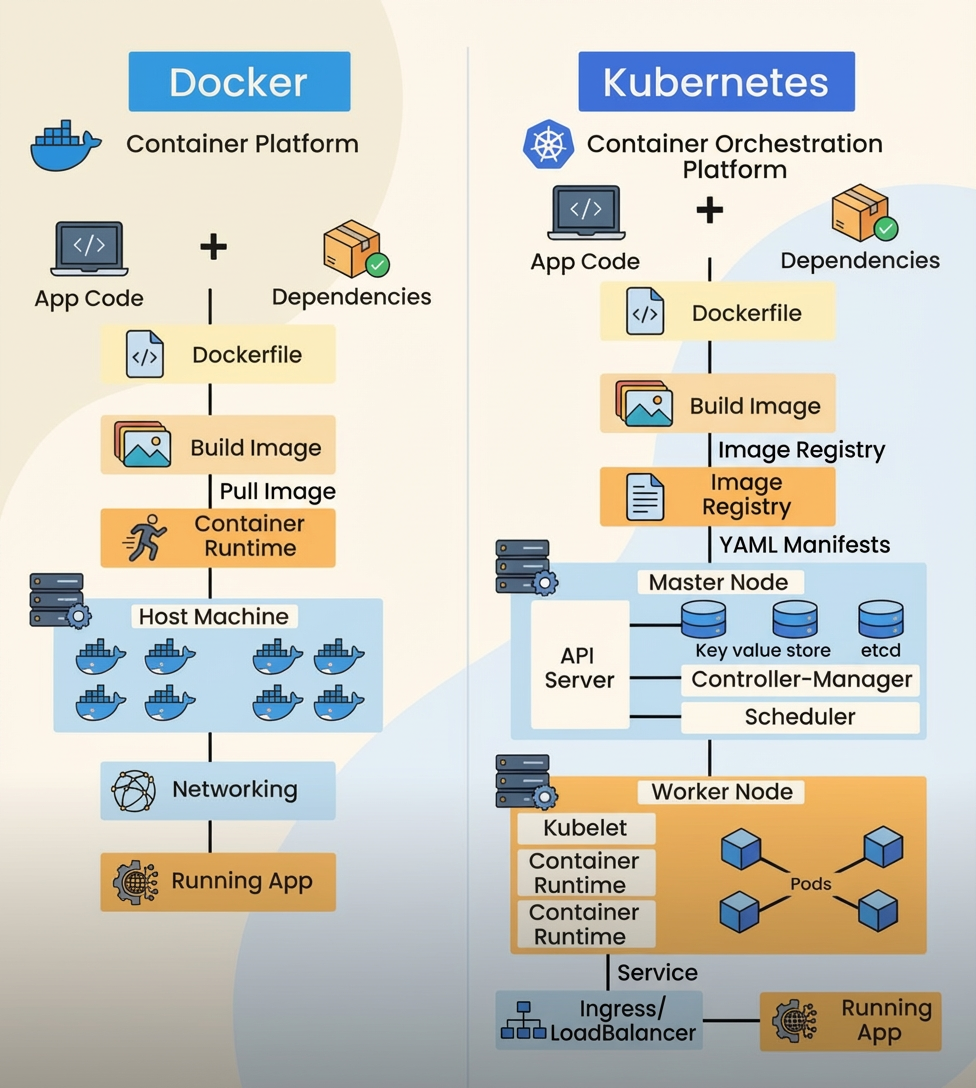
Containers changed how we deploy software. But Docker and Kubernetes do different things — here’s what you need to know.
What is Docker?
Docker creates containers. It packages your app with all dependencies so it runs the same everywhere.
- Builds container images from your code
- Runs containers on a single machine
- Solves the “works on my machine” problem
What is Kubernetes?
Kubernetes manages containers at scale. It doesn’t build containers — it orchestrates them across multiple servers.
- Distributes containers across a cluster
- Auto-restarts crashed containers
- Scales up/down based on demand
- Handles load balancing
Docker vs Kubernetes: Comparison
| Aspect | Docker | Kubernetes |
|---|---|---|
| Purpose | Build and run containers | Orchestrate containers at scale |
| Scope | Single machine | Multiple machines (cluster) |
| Scaling | Manual | Automatic |
| Self-Healing | No | Yes — restarts failed containers |
| Load Balancing | Basic | Built-in |
| Setup | Simple | Complex |
| Best For | Development, small deployments | Production, microservices |
When to Use Each
Use Docker alone:
- Local development
- Small apps on one server
- CI/CD pipelines
Add Kubernetes:
- Production workloads needing high availability
- Multiple services across servers
- Auto-scaling requirements
How They Work Together
Docker builds the image → Push to registry → Kubernetes deploys and manages it
They’re not competitors — Docker packages, Kubernetes orchestrates.
Summary
Docker = container builder
Kubernetes = container manager
Start with Docker. Add Kubernetes when you need scale and reliability.
#devops,
#containers,
#docker,
#kubernetes,
#cloudnative,
#microservices,
#cicd,
#aws,
#azuredevops,
#googlecloud,
#sre,
#platformengineering,
#iac,
#k8s,
#automation,
#cloudengineering,
#softwareengineering,
#scalability,
#observability,
#devopsculture,
#digitaltransformation,
#containerorchestration